原生错误
代码签名错误
Code Signing Error: Failed to create provisioning profile. The app ID "com.csform.ionic.yellow" cannot be registered to your development team. Change your bundle identifier to a unique string to try again. Code Signing Error: No profiles for 'com.csform.ionic.yellow' were found: Xcode couldn't find any iOS App Development provisioning profiles matching 'com.csform.ionic.yellow'. Code Signing Error: Code signing is required for product type 'Application' in SDK 'iOS 11.1'
在 iOS 设备上运行应用需要 provisioning profile。如果尚未创建 provisioning profile,请按照以下步骤操作:
-
设置包 ID。
对于 Capacitor,打开
capacitor.config.json文件并修改appId属性。对于 Cordova,打开
config.xml文件并修改根元素<widget>的id属性。有关更多信息,请参阅 Cordova 文档。
-
在 Xcode 中打开项目。
对于 Capacitor,运行以下命令在 Xcode 中打开应用:
$ ionic capacitor open ios对于 Cordova,打开 Xcode。使用文件 » 打开并找到应用。打开应用的
platforms/ios目录。
-
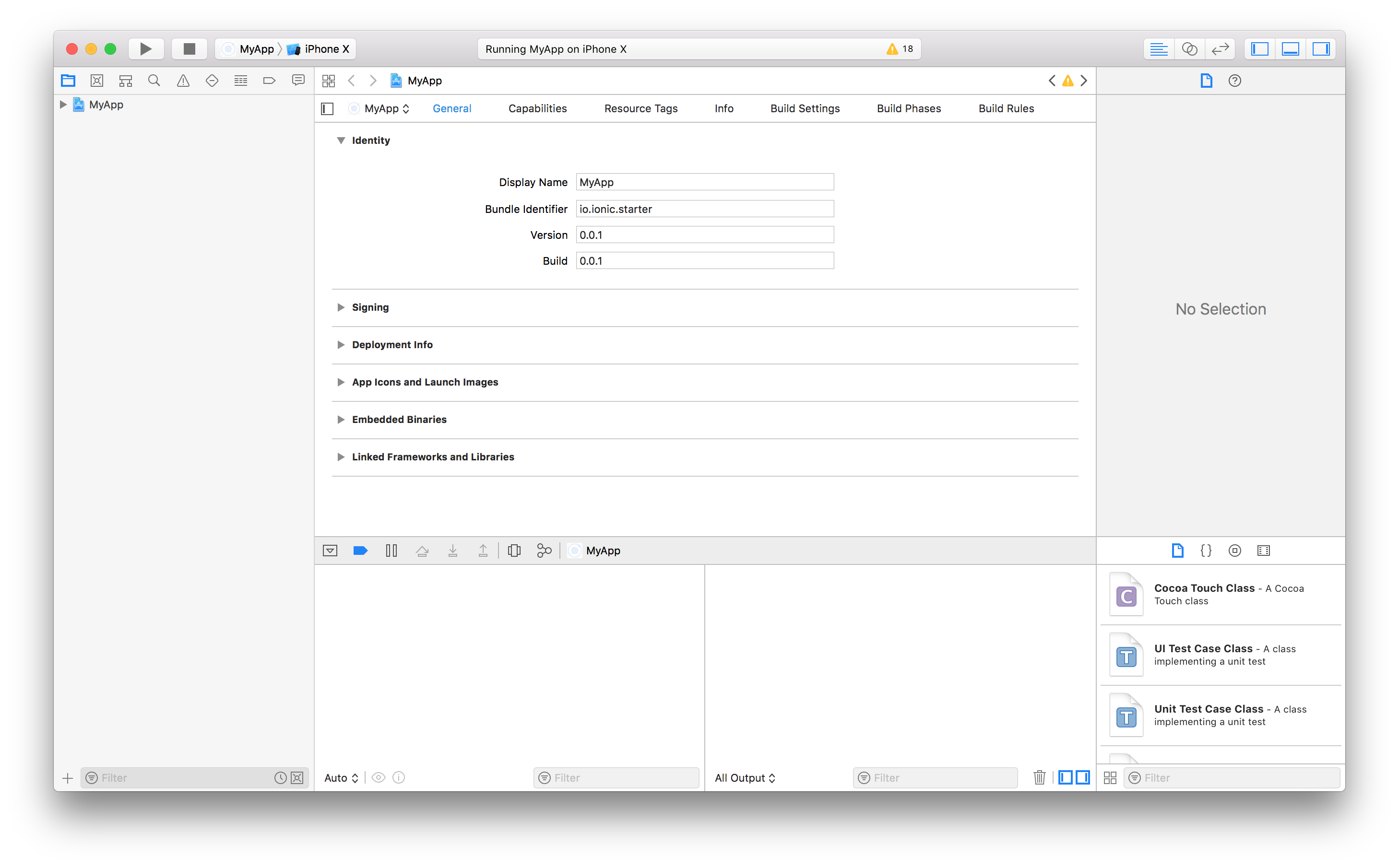
在项目导航器中,选择项目根节点以打开项目编辑器。在身份部分下,验证设置的包 ID 与 Bundle Identifier 匹配。
-
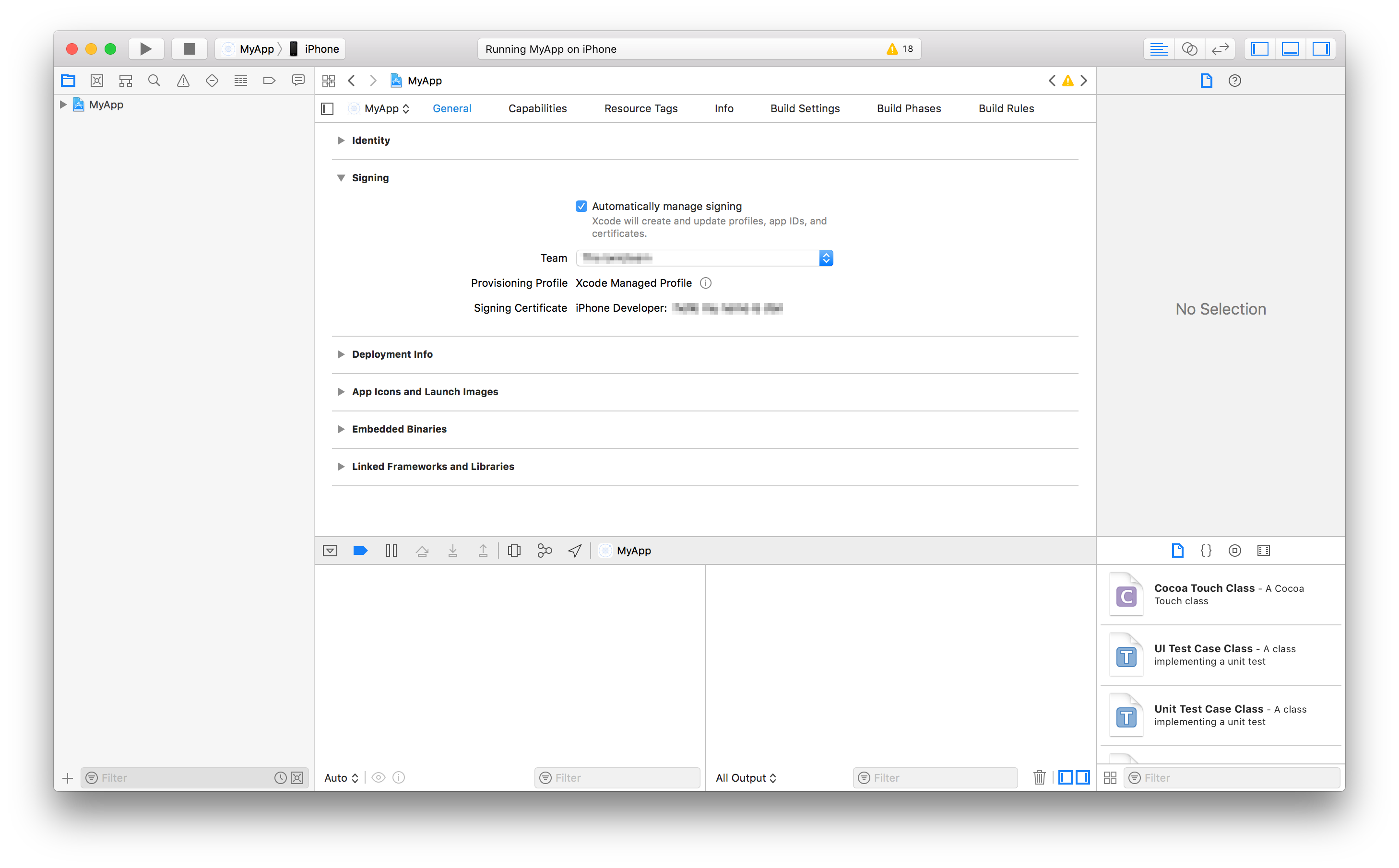
在同一项目编辑器中,签名部分下,确保已启用自动管理签名。 然后,选择一个开发团队。指定开发团队后,Xcode 将尝试自动准备 provisioning 和签名。
Xcode 构建错误 65
Error: Error code 65 for command: xcodebuild with args: -xcconfig,/Users/ionitron/projects/my-project/platforms/ios/cordova/build-debug.xcconfig,-workspace,SC project.xcworkspace,-scheme,SC project,-configuration,Debug,-sdk,iphonesimulator,-destination,platform=iOS Simulator,name=iPhone X,build,CONFIGURATION_BUILD_DIR=/Users/ionitron/projects/my-project/platforms/ios/build/emulator,SHARED_PRECOMPS_DIR=/Users/ionitron/projects/my-project/platforms/ios/build/sharedpch
此错误是来自 Xcode 的错误代码,可能由 provisioning 问题或过时的 cordova 依赖项引起。要修复此错误,首先确保已按照上述说明生成 provisioning profile,然后尝试从 Xcode 运行应用。
如果这不能修复错误,则运行以下命令:
rm -rf node_modules
rm -rf platform
npm i
ionic cordova platform add ios
ionic cordova prepare ios
ionic cordova build ios --prod
运行这些命令后,可以进行全新的构建。
Google Play Services 版本冲突
Error: more than one library with package name com.google.android.gms
此错误是由两个不同的插件尝试使用不同版本的 Google Play Services 引起的。要修复此问题,请确保你运行的是 cordova 版本 7.1.0 或更高版本,以及 cordova-android 6.3.0 或更高版本。要安装最新的 cordova,运行:
npm install cordova@latest
要更新 cordova-android,运行:
cordova platform update android
依赖 Google Play Services 的插件现在可以更新到使用相同的版本。例如,如果 pluginA 使用版本 11.0,pluginB 使用版本 15.0,可以通过在 config.xml 文件中使用以下片段将它们更新到使用相同版本:
<plugin name="pluginA" spec="npm">
  <variable name="PLAY_SERVICES_VERSION" value="15.0.0"/>
</plugin>
<plugin name="pluginB" spec="npm">
  <variable name="PLAY_SERVICES_VERSION" value="15.0.0" />
</plugin>